
Inspiration gallery
Balloon Décor Inspiration & Design Recipes for Professional Decorators
Every image here is a straight export from BalloonBuilder, and every card is a full balloon recipe — count by size, colours by brand and dimensions — so you can quote a similar balloon installation today. No sign-up needed to browse these balloon design examples.
Put any design below into a photo of the room. Nothing to install, no account.
The same design, planned and built
The intro above says every image here is a straight export. This is what that looks like on a real job: the plan that went to the client, and the piece as it was built.
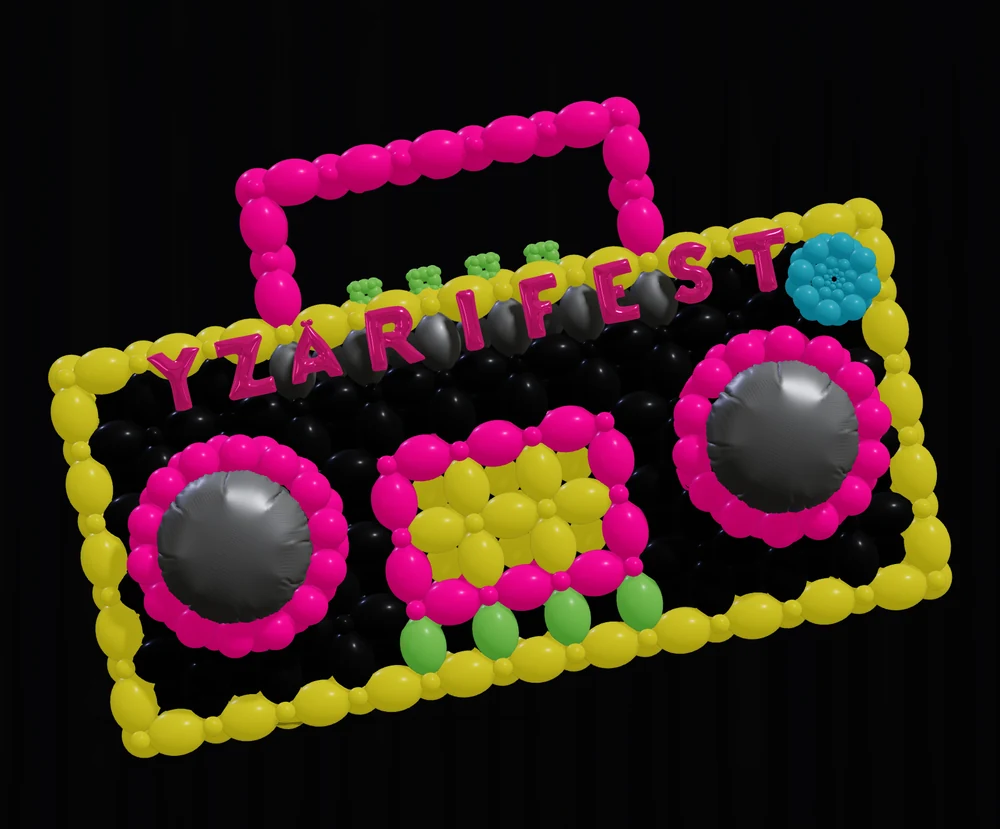
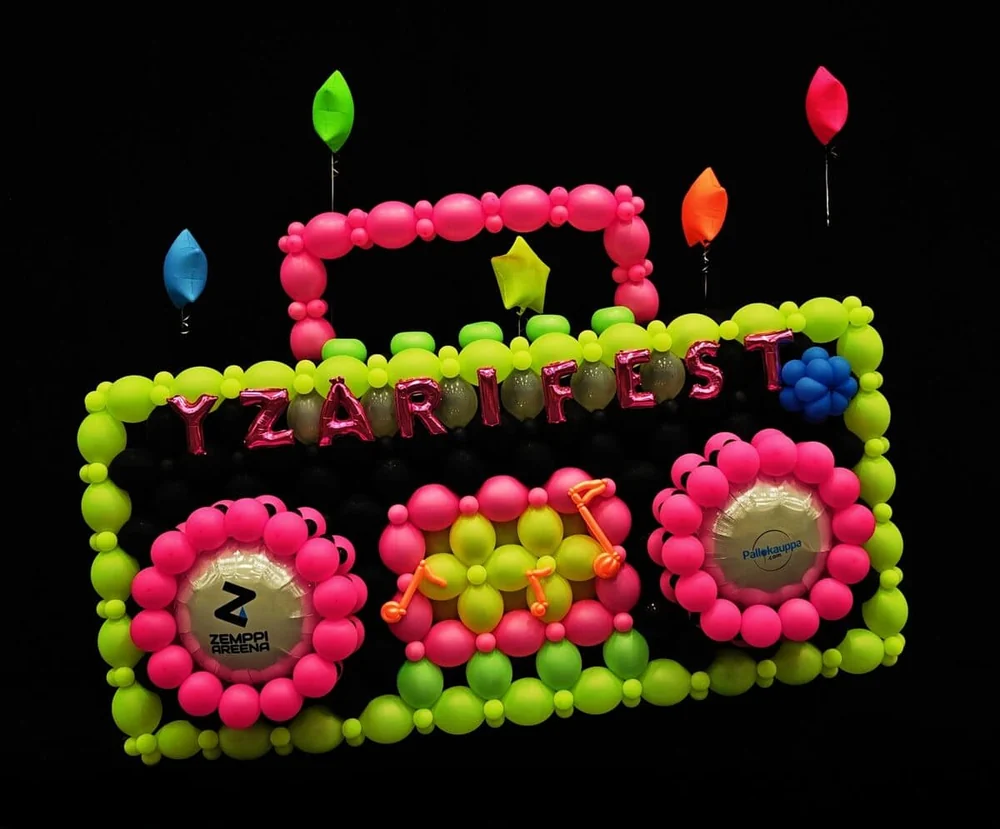
Same crop on both, so you are comparing like with like. Judge the match yourself — the build added floating balloons and foil letters that were not in the plan, which is what usually happens between the quote and the day.
One caveat worth saying out loud: neon under UV is the hardest case there is to model. Neon balloons fluoresce, so the colour your eye reads is never quite the colour a renderer computes — and it shifts with the room, because no venue is ever lit with pure UV. How much UV a room really has, and at what wavelength, is not something you can know in advance. That is why SceneBuilder gives UV a single Intensity slider instead of a bank of controls: more dials would only offer a precision that is not there to be had. The neon here is a close estimate rather than an exact match, and near enough to quote from and to show a client, which is what the plan is for.
Balloon Arch Inspiration & Event Entrance Ideas
Entrance pieces and stage frames. Each one lists what it takes to build, not just how it looks.
Black & gold 4-layer spiral arch
- Count by size
- 132 balloons — 132 × 12″
- Brands & colours
- Sempertex Black 080 × 66, Reflex Gold 970 × 66
- Dimensions
- 12 ft 11 in × 8 ft 1 in (395 cm × 247 cm) · path length 18 ft 5 in (562 cm)
Build note: 12″ inflated to 10″ (25 cm). 33 layers.
Create a similar design in the Arch Designer →
Create a palette in PaletteBuilder → or try the free Balloon Color Matcher →
Red & white straight-sided entrance arch
- Count by size
- 132 balloons — 132 × 12″
- Brands & colours
- Sempertex Imperial Red 016 × 66, Reflex Gold 970 × 33, White 005 × 33
- Dimensions
- 8 ft 3 in × 9 ft 5 in (251 cm × 288 cm) · path length 18 ft 5 in (562 cm)
Build note: 12″ inflated to 10″ (25 cm). 33 layers.
Create a similar design in the Arch Designer →
Create a palette in PaletteBuilder → or try the free Balloon Color Matcher →
Glass-effect double-stuffed arch in soft blue
- Count by size
- 264 balloons — 264 × 12″
- Brands & colours
- Sempertex Crystal Clear 390 × 66, Aquamarine 037 × 33, White 005 × 132, Blue 040 × 33
- Dimensions
- 12 ft 11 in × 8 ft 1 in (395 cm × 247 cm) · path length 18 ft 5 in (562 cm)
Build note: Glass effect rather than a plain double-stuff: the coloured balloons sit inside larger Crystal Clear 390 shells, so each one reads as glass instead of as a solid. Two balloons to every position — 264 for 132 positions. 12″ inflated to 10″ (25 cm). 33 layers.
Create a similar design in the Arch Designer →
Create a palette in PaletteBuilder → or try the free Balloon Color Matcher →
Foil letter arch with star toppers
- Count by size
- 152 latex balloons — 32 × 12″ and 120 × 5″, plus 18 exploding star points and OPENING in 40″ foil letters
- Brands & colours
- Sempertex White 005 × 76, Black 080 × 38, Reflex Silver 981 × 38
- Dimensions
- 19 ft 9 in × 12 ft 2 in (603 cm × 371 cm)
Build note: Split 50% White 005, 25% Black 080 and 25% Reflex Silver 981 across the 152 latex balloons. The 18 exploding star points and the 40″ foil letters are extra to that count.
Create a similar design in the Arch Designer →
Create a palette in PaletteBuilder → or try the free Balloon Color Matcher →
Pastel rainbow arch with clouds
- Count by size
- approx. 440–460 balloons — 360 pastel matte (60 of each of six colours), plus approx. 60–80 × 12″ white and 20 × 18″ white
- Brands & colours
- Sempertex Pastel Matte, six colours (names TBD) × 360, White 005
- Dimensions
- 15 ft 6 in × 8 ft 11 in (473 cm × 271 cm)
Build note: Six Sempertex Pastel Matte colours banded across the arch, with the clouds at each foot built in White 005 — 12″ rounds through the body and 18″ rounds for the larger cloud balloons. The white count is an estimate, not a count sheet.
Create a similar design in the Arch Designer →
Create a palette in PaletteBuilder → or try the free Balloon Color Matcher →
Organic Balloon Garland Inspiration & Recipes
Organic work, where the size mix and the density setting decide the count.
Sage & cream organic demi arch
- Count by size
- 375 balloons — 103 × 5″, 261 × 12″, 11 × 18″
- Brands & colours
- Sempertex Eucalyptus 027 × 171, White Sand 071 × 63, Almond White 006 × 69, Pastel Dusk Cream 107 × 72
- Dimensions
- 5 ft 4 in × 7 ft 7 in (162 cm × 231 cm) · depth 3 ft 9 in (114 cm)
Build note: Organic mix, 3″–12.5″ (7–32 cm).
Create a similar design in the Arch & Garland Designer →
Create a palette in PaletteBuilder → or try the free Balloon Color Matcher →
Blush & nude organic garland with rose gold accents
- Count by size
- 785 balloons — 629 × 5″, 152 × 12″, 4 × 18″
- Brands & colours
- Sempertex Pastel Matte Pink 609 × 145, Pastel Matte Nude 661 × 160, Creamy Blush 058 × 160, Silk Pink Blossom 809 × 160, Reflex Rose Gold 968 × 160
- Dimensions
- 9 ft 8 in × 2 ft 6 in (296 cm × 76 cm)
Build note: 40 clusters.
Create a similar design in the Arch & Garland Designer →
Create a palette in PaletteBuilder → or try the free Balloon Color Matcher →
Terracotta organic garland
- Count by size
- 100 balloons — 100 × 12″
- Brands & colours
- Sempertex Terracotta 072 × 20, Creamy Blush 058 × 20, Latte 073 × 20, Sunset Orange 062 × 20, White Sand 071 × 20
- Dimensions
- 2 ft 3 in × 8 ft 2 in (68 cm × 249 cm)
Build note: 20 clusters.
Create a similar design in the Arch & Garland Designer →
Create a palette in PaletteBuilder → or try the free Balloon Color Matcher →
Black & gold S-curve garland
- Count by size
- 130 balloons — 120 × 12″, 10 × 18″
- Brands & colours
- Sempertex Black 080 × 43, White 005 × 41, Reflex Gold 970 × 46
- Dimensions
- 5 ft 6 in × 9 ft 1 in (168 cm × 277 cm)
Build note: 26 clusters.
Create a similar design in the Arch & Garland Designer →
Create a palette in PaletteBuilder → or try the free Balloon Color Matcher →
Six-colour organic garland with balloon flowers and spikes
- Count by size
- 209 balloons — 194 × 12″, 12 × 18″
- Brands & colours
- Sempertex Eucalyptus 027 × 68, Rosewood 010 × 39, White Sand 071 × 40, Pastel Dusk Rose 110 × 32, Pastel Dusk Cream 107 × 27 · Star points × 3, gold
- Dimensions
- 3 ft 10 in × 9 ft 6 in (117 cm × 290 cm) · depth 4 ft 7 in (140 cm)
Build note: Organic mix, 4.5″–12″ (11–30 cm). The balloon flowers are not in that count: the 260 modelling balloons twisted into the petals, and the round balloon at each centre, are not costed by the stock table. Add them from your own build sheet. The star points are counted as pieces, not as material.
Create a similar design in the Arch & Garland Designer →
Create a palette in PaletteBuilder → or try the free Balloon Color Matcher →
Balloon Backdrop Ideas & Wall Installations for Events
Standing walls and backdrops: grid, link and organic builds on a frame.
Navy & white link-grid backdrop
- Count by size
- 338 balloons — 128 × 5″, 98 × 12″, 112 × 12″ Link-O-Loon
- Brands & colours
- Sempertex Navy Blue 044 × 112, Periwinkle Blue 042 × 128, White 005 × 98
- Dimensions
- 8 ft 4 in × 8 ft 4 in (254 cm × 254 cm) · depth 17.5″ (45 cm)
Build note: 12″ Link-O-Loon inflated to 12″ (30 cm), 12″ inflated to 8″ (20 cm), 5″ inflated to 4″ (9.9 cm).
Create a similar design in the Wall Designer →
Create a palette in PaletteBuilder → or try the free Balloon Color Matcher →
Blush plus-pattern link backdrop
- Count by size
- 434 balloons — 168 × 5″, 122 × 12″, 144 × 12″ Link-O-Loon
- Brands & colours
- Sempertex Creamy Blush 058 × 144, Pink 009 × 168, White 005 × 122
- Dimensions
- 8 ft 8 in × 8 ft 8 in (264 cm × 264 cm) · depth 17.5″ (45 cm)
Build note: 12″ Link-O-Loon inflated to 12″ (30 cm), 12″ inflated to 8″ (20 cm), 5″ inflated to 4″ (9.9 cm).
Create a similar design in the Wall Designer →
Create a palette in PaletteBuilder → or try the free Balloon Color Matcher →
Landscape image backdrop in duplet square pack
- Count by size
- 8192 balloons — 8192 × 12″
- Brands & colours
- Sempertex Deep Teal 035 × 92, Forest Green 032 × 1024, Caribbean Blue 038 × 42, Shamrock Green 029 × 1698, Green 030 × 220, Periwinkle Blue 042 × 106, Blue 040 × 992, Aquamarine 037 × 32, Eucalyptus 027 × 48, Lilac 050 × 76
- Dimensions
- 36 ft 5 in × 42 ft 4 in (1110 cm × 1290 cm) · depth 13.5″ (35 cm)
Build note: 12″ inflated to 8″ (20 cm).
Create a similar design in the Wall Designer →
Create a palette in PaletteBuilder → or try the free Balloon Color Matcher →
Terracotta organic backdrop with spikes
- Count by size
- 755 balloons — 648 × 12″, 100 × 18″, 3 × 24″
- Brands & colours
- Sempertex Coffee 074 × 178, Mocha 070 × 180, Terracotta 072 × 195, White Sand 071 × 198 · Star points × 4, gold
- Dimensions
- 7 ft 10 in × 6 ft 11 in (239 cm × 211 cm) · depth 3 ft 6 in (107 cm)
Build note: Organic mix, 4.5″–22″ (12–56 cm).
Create a similar design in the Wall Designer →
Create a palette in PaletteBuilder → or try the free Balloon Color Matcher →
Photo-mapped portrait backdrop
- Count by size
- 11520 balloons — 11520 × 12″
- Brands & colours
- Tuftex Evergreen × 168, Black × 168 · Sempertex Black 080 × 432, Chocolate 076 × 834, Merlot 018 × 986 · Gemar Black 014 × 290, Navy 102 × 1614 · Kalisan Navy × 18, Dark Green × 286, Chocolate Brown × 276
- Dimensions
- 18 ft 3 in × 23 ft 6 in (556 cm × 716 cm) · depth 6″ (15 cm)
Build note: 5″ inflated to 3.5″ (8.9 cm).
Create a similar design in the Wall Designer →
Create a palette in PaletteBuilder → or try the free Balloon Color Matcher →
Balloon Column Ideas for Events & Commercial Sculptures
Columns and free-standing sculptures, including the shaped pieces clients ask for by name.
Black & gold spiral column with star topper
- Count by size
- 44 balloons — 44 × 12″
- Brands & colours
- Sempertex Black 080 × 22, Reflex Gold 970 × 22
- Dimensions
- 2 ft 10 in × 8 ft 1 in (86 cm × 246 cm) · column 5 ft 7 in (170 cm), 36″ foil star
Build note: 12″ inflated to 8″ (20 cm) (pump timer 0.9 s). 36″ inflated to 34″ (86 cm). 12 layers. Topper: 36″ Grabo foil star.
Create a similar design in the Column Designer →
Create a palette in PaletteBuilder → or try the free Balloon Color Matcher →
Red & white entrance column with a foil number 5
- Count by size
- 44 balloons — 44 × 12″
- Brands & colours
- Sempertex Imperial Red 016 × 22, White 005 × 22
- Dimensions
- 2 ft 11 in × 8 ft 4 in (90 cm × 255 cm) · column 5 ft 7 in (170 cm), 40″ foil number
Build note: 12″ inflated to 8″ (20 cm) (pump timer 0.9 s). 36″ inflated to 35.5″ (90 cm). 12 layers. Topper: 40″ Grabo foil number.
Create a similar design in the Column Designer →
Create a palette in PaletteBuilder → or try the free Balloon Color Matcher →
Red & white entrance column with a foil number 0
- Count by size
- 44 balloons — 44 × 12″
- Brands & colours
- Sempertex Imperial Red 016 × 22, White 005 × 22
- Dimensions
- 2 ft 11 in × 8 ft 4 in (90 cm × 255 cm) · column 5 ft 7 in (170 cm), 40″ foil number
Build note: 12″ inflated to 8″ (20 cm) (pump timer 0.9 s). 36″ inflated to 35.5″ (90 cm). 12 layers. Topper: 40″ Grabo foil number.
Create a similar design in the Column Designer →
Create a palette in PaletteBuilder → or try the free Balloon Color Matcher →
Tapered pastel column
- Count by size
- 60 balloons — 60 × 12″
- Brands & colours
- Sempertex Blue 040 × 40, White 005 × 5, Pastel Matte Blue 640 × 15
- Dimensions
- 24″ × 6 ft 7 in (61 cm × 201 cm) · column 4 ft 9 in (146 cm), latex topper
Build note: 12″ inflated to 4.5″ (11 cm) (pump timer <0.1 s). 12″ inflated to 6″ (15 cm) (pump timer 0.4 s). 12″ inflated to 7″ (18 cm) (pump timer 0.6 s). 12″ inflated to 8″ (20 cm) (pump timer 0.9 s). 12″ inflated to 9″ (23 cm) (pump timer 1.3 s). 24″ inflated to 23.5″ (60 cm). 13 layers. Topper: latex balloon.
Create a similar design in the Column Designer →
Create a palette in PaletteBuilder → or try the free Balloon Color Matcher →
Ball column with a printed logo topper
- Count by size
- 75 balloons — 30 × 5″, 45 × 12″
- Brands & colours
- Sempertex Royal Blue 041 × 45, White 005 × 30
- Dimensions
- 23.5″ × 7 ft 1 in (60 cm × 216 cm) · column 5 ft 4 in (161 cm), latex topper
Build note: 12″ inflated to 6″ (15 cm) (pump timer 0.4 s). 12″ inflated to 8″ (20 cm) (pump timer 0.9 s). 5″ inflated to 4″ (10 cm) (pump timer 0.2 s). 24″ inflated to 23.5″ (60 cm). 16 layers. Topper: latex balloon.
Create a similar design in the Column Designer →
Create a palette in PaletteBuilder → or try the free Balloon Color Matcher →
Link-O-Loon column in pinks
- Count by size
- 92 balloons — 48 × 5″, 44 × 12″ Link-O-Loon
- Brands & colours
- Sempertex Raspberry 014 × 12, Rose 011 × 44, Fuchsia 012 × 12, Pink 009 × 24
- Dimensions
- 2 ft 6 in × 8 ft 11 in (75 cm × 272 cm) · column 6 ft 8 in (202 cm), latex topper
Build note: 12″ Link-O-Loon inflated to 12″ (30 cm) (pump timer 1.6 s). 5″ inflated to 4″ (10 cm) (pump timer 0.2 s). 36″ inflated to 29.5″ (75 cm). 12 layers. Topper: latex balloon.
Create a similar design in the Column Designer →
Create a palette in PaletteBuilder → or try the free Balloon Color Matcher →
Hot air balloon sculpture with basket
- Count by size
- 2133 balloons — 1065 × 5″, 528 × 6″ Link-O-Loon, 540 × 12″ Link-O-Loon
- Brands & colours
- Sempertex Raspberry 014 × 480, Rose 011 × 480, Fuchsia 012 × 480, Pink 009 × 480, Mocha 070
- Dimensions
- 9 ft × 14 ft 6 in (274 cm × 441 cm) · envelope over a basket
Build note: The envelope is a Link-O-Loon column laid horizontally. The basket is one panel of 35 × 5″, 16 × 6″ Link-O-Loon and 20 × 12″ Link-O-Loon, built three times. It stands 14 ft 6 in (441 cm) to the top, with room for an adult to stand under the envelope.
Create a similar design in the Column Designer →
Create a palette in PaletteBuilder → or try the free Balloon Color Matcher →
Mosaic Frames & Blueprints — Numbers, Letters & Shapes
Frames filled with balloons, plus the page map for the printable pack that goes with them.
Number 30 mosaic frame in black & gold
- Count by size
- About 190–290 balloons — roughly 125–190 × 5″, 65–100 × 12″
- Brands & colours
- Sempertex Black 080 × 50–75, Reflex Gold 970 × 70–105, White 005 × 70–110
- Dimensions
- 5 ft 8 in × 5 ft (173 cm × 152 cm)
Build note: Organic mix, 2.5″–7.5″ (6–19 cm). A mosaic frame is packed rather than laid out, so treat these as ranges. For a firmer number, build the shape in the Mosaic Designer in BalloonBuilder Walls and read its count sheet.
Create a similar design in the Mosaic Designer →
Create a palette in PaletteBuilder → or try the free Balloon Color Matcher →
Number 1 mosaic frame in pink
- Count by size
- About 80–120 balloons — roughly 55–80 × 5″, 25–40 × 12″
- Brands & colours
- Sempertex Rose 011 × 30–45, Pastel Matte Pink 609 × 20–30, Pink 009 × 30–45
- Dimensions
- 3 ft 6 in × 5 ft (107 cm × 152 cm)
Build note: Organic mix, 2″–7.5″ (5–19 cm). The packer fits in more 5″ than a real build needs once the small balloons outnumber the large ones this heavily, so the 5″ figure here is brought back to about twice the 12″ count, which is where a real build settles. A mosaic frame is packed rather than laid out, so treat these as ranges. For a firmer number, build the shape in the Mosaic Designer in BalloonBuilder Walls and read its count sheet.
Create a similar design in the Mosaic Designer →
Create a palette in PaletteBuilder → or try the free Balloon Color Matcher →
Heart mosaic frame in blush & nude
- Count by size
- About 280–420 balloons — roughly 185–280 × 5″, 95–140 × 12″
- Brands & colours
- Sempertex Mocha 070 × 95–145, Reflex Gold 970 × 35–55, Reflex Champagne 971 × 40–55, Pastel Matte Nude 661 × 110–165
- Dimensions
- 5 ft 6 in × 5 ft (167 cm × 152 cm)
Build note: Organic mix, 1.5″–8.5″ (4–21 cm). The packer fits in more 5″ than a real build needs once the small balloons outnumber the large ones this heavily, so the 5″ figure here is brought back to about twice the 12″ count, which is where a real build settles. A mosaic frame is packed rather than laid out, so treat these as ranges. For a firmer number, build the shape in the Mosaic Designer in BalloonBuilder Walls and read its count sheet.
Create a similar design in the Mosaic Designer →
Create a palette in PaletteBuilder → or try the free Balloon Color Matcher →
Baby feet mosaic frame in blue & pink
- Count by size
- About 220–330 balloons — roughly 133–198 × 5″, 85–130 × 12″, 2 × 18″
- Brands & colours
- Sempertex Blue 040 × 130–190, Pink 009 × 90–140
- Dimensions
- 6 ft 7 in × 5 ft (200 cm × 152 cm)
Build note: Organic mix, 2″–12″ (5–31 cm). A mosaic frame is packed rather than laid out, so treat these as ranges. For a firmer number, build the shape in the Mosaic Designer in BalloonBuilder Walls and read its count sheet.
Create a similar design in the Mosaic Designer →
Create a palette in PaletteBuilder → or try the free Balloon Color Matcher →
Graduation ’26 frame with a balloon-filled cap
- Count by size
- About 260–390 balloons — roughly 175–260 × 5″, 85–130 × 12″
- Brands & colours
- Sempertex Black 080 × 80–120, Reflex Gold 970 × 60–85, White 005 × 120–185
- Dimensions
- 7 ft 1 in × 5 ft (215 cm × 152 cm)
Build note: Organic mix, 1″–7″ (2–18 cm). The packer fits in more 5″ than a real build needs once the small balloons outnumber the large ones this heavily, so the 5″ figure here is brought back to about twice the 12″ count, which is where a real build settles. A mosaic frame is packed rather than laid out, so treat these as ranges. For a firmer number, build the shape in the Mosaic Designer in BalloonBuilder Walls and read its count sheet.
Create a similar design in the Mosaic Designer →
Create a palette in PaletteBuilder → or try the free Balloon Color Matcher →
Printable page map for a mosaic frame
This is the page map, not the pack itself: it shows which A4 or Letter sheets the printable pack covers, lettered so you can lay them out on the floor in order. The Mosaic Designer, which lives inside the Wall Designer, exports the full-size sheet for a large-format printer and the tiled version for a home printer, and a complete worked example is on the Mosaic Designer page.
Create a similar design in the Mosaic Designer →
Create a palette in PaletteBuilder → or try the free Balloon Color Matcher →
Transparent render still to come, so this one can’t be placed in a photo yet.
Not available in the venue preview yet.
Balloon Tunnel Ideas & Walk-Through Installations
Walk-through pieces. Give yourself room for the frame and the crew time to match.
White & gold link-grid tunnel
- Count by size
- 1484 balloons — 528 × 5″, 462 × 12″, 494 × 12″ Link-O-Loon
- Brands & colours
- Sempertex Reflex Gold 970 × 990, White 005 × 494
- Dimensions
- 9 ft 4 in × 9 ft 6 in (284 cm × 289 cm) · walk-through depth 8 ft 8 in (263 cm), clear opening 6 ft 5 in (196 cm)
Build note: 12″ Link-O-Loon inflated to 12″ (30 cm), 12″ inflated to 8″ (20 cm), 5″ inflated to 4″ (10 cm).
Create a similar design in the Wall Designer →
Create a palette in PaletteBuilder → or try the free Balloon Color Matcher →
Brand-colour square tunnel
- Count by size
- 1484 balloons — 528 × 5″, 462 × 12″, 494 × 12″ Link-O-Loon
- Brands & colours
- Sempertex Royal Blue 041 × 462, White 005 × 1022
- Dimensions
- TBD
Build note: 12″ Link-O-Loon inflated to 12″ (30 cm), 12″ inflated to 8″ (20 cm), 5″ inflated to 4″ (10 cm).
Create a similar design in the Wall Designer →
Create a palette in PaletteBuilder → or try the free Balloon Color Matcher →
Foil square tunnel in gold & silver
- Count by size
- 160 foil squares
- Brands & colours
- Foil squares × 108, silver · Foil squares × 52, gold
- Dimensions
- 9 ft 3 in × 8 ft (282 cm × 243 cm) · walk-through depth 8 ft 7 in (261 cm), clear opening 8 ft 3 in (252 cm)
Build note: No latex in this one: the stock is 160 foil squares over a tunnel frame, 108 silver and 52 gold.
Create a similar design in the Wall Designer →
Create a palette in PaletteBuilder → or try the free Balloon Color Matcher →
Organic-covered tunnel with foil accents
- Count by size
- A combination piece — take the counts from the two designs it is built from
- Brands & colours
- TBD
- Dimensions
- TBD
Build note: Two organic arches built over the foil square tunnel. There is no single count sheet for it; use the foil square tunnel’s stock plus your own organic arch.
Create a similar design in the Wall Designer →
Create a palette in PaletteBuilder → or try the free Balloon Color Matcher →
Designs in Motion
Short clips of a design turning, and of a room built around one.
Turntable: hot air balloon sculpture
Create a similar design in the SceneBuilder →
Create a palette in PaletteBuilder → or try the free Balloon Color Matcher →
Fly-through: organic-covered tunnel
Create a similar design in the SceneBuilder →
Create a palette in PaletteBuilder → or try the free Balloon Color Matcher →
Build-up: shimmer wall with an organic garland
Create a similar design in the SceneBuilder →
Create a palette in PaletteBuilder → or try the free Balloon Color Matcher →
Balloon drop: LOVE marquee letters
Create a similar design in the SceneBuilder →
Create a palette in PaletteBuilder → or try the free Balloon Color Matcher →
Send us yours
Built something from a BalloonBuilder design? Send the export and a photo of the finished job to [email protected]. We publish it here with your name and a link to your business, and we add the recipe you send with it, so the next decorator looking for balloon decor inspiration finds your work first. You keep the design.
Questions decorators ask about this gallery
Yes — show them to a client, put one in a quote, or drop one into a photo of their venue with the preview tool on this page. The balloon designs are © BalloonBuilder.com and may be used in previews for your own clients. The photo is yours: it never leaves your device, we don’t store or see it, and you are responsible for having the right to use it — including any people, venues, logos or artwork in it. Previews are illustrations, not measured plans; sizes and counts come from the designers.
Renders. Every image on this page is a straight export from BalloonBuilder with no retouching, which is why the colours match the manufacturer names in the recipe. For a plan and the finished job side by side, see the same design, planned and built at the top of the page.
Please do. Send the export and, if you have it, a photo of the build to [email protected]. If it goes up, your name and your business link go on the card. You keep the design; we only publish the picture and the recipe you send with it.
Scale it with the free balloon calculator — put in your own dimensions and it gives the count by size for that piece.
That photo could not be opened here. On an iPhone, set Settings → Camera → Formats → Most Compatible, or share the photo as a JPEG and pick it again.
Your photo never leaves your phone or computer. Everything happens in the browser.
The balloon designs are © BalloonBuilder.com and may be used in previews for your own clients. The photo is yours: it never leaves your device, we don’t store or see it, and you are responsible for having the right to use it — including any people, venues, logos or artwork in it. Previews are illustrations, not measured plans; sizes and counts come from the designers.
Want this in your colours and size? Create a similar design in the
Arch & Garland Designer, or start from a palette in
PaletteBuilder or the free
Balloon Color Matcher.
Want your own design in the room, in 3D? That’s SceneBuilder.
Tap a design to place it
Up to 3Replace which one?
Three designs are already on the photo. Pick the one to swap out.
Share this design: copy the link