

BalloonBuilder Overview
Professional Balloon Design Tool — Design in 2D, Visualize in 3D
Overview
BalloonBuilder is a professional balloon decoration design tool that lets you create stunning columns, arches, walls, and organic designs with instant 3D visualization and precise calculations.
Columns & Arches Designer
The main application for designing balloon columns, arches, rainbow arches, and organic garlands.

The Columns & Arches Designer showing a 3D balloon column with side menu controls
🖥️ Interface Layout
- Top Bar: Contains global controls like Units (cm/inches), Theme (Light/Dark), View modes (2D, 3D, or both), Organic toggle, and Save/Load buttons.
- Left Side Menu: Contains all design controls organized into collapsible sections.
- Main Area: Split view showing 2D canvas on the left and 3D viewport on the right.
- Bottom Palette: Color palette for selecting balloon colors.
📐 Design & Size Section
The primary controls for your design:
- Mode: Select your design type — Column, Arch, Demi-Arch, U-Arch, Rainbow Arch, Custom Path, LOL Column, etc.
- Layers: Set the number of balloon layers in your column or arch.
- Balloons per layer: Choose how many balloons are on each layer (4, 5, 6, etc.).
- Balloon size: Set the inflated size of balloons in cm or inches.
- Flat column/arch: Toggle to create flat (2D-style) designs instead of round ones.
🎨 Size Pattern Section
Control how balloon sizes vary throughout your design:
- Uniform: All balloons the same size.
- Alternate (A/B): Alternating between two sizes.
- Gradient: Smooth transition from Size A to Size B.
- Taper: Linear size change from bottom to top.
- Presets: Light Pole, Champagne, Bowling Pin, Ball Column shapes.
- Manual: Set each layer’s size individually.
- Top Balloon: Select topper type — large round, large round with bubble cover, spray of 260 balloons, foil star, exploding star, and more.
🖌️ Paint / Tools Section
Tools for coloring and customizing your design:
- Paint Tool: Click on balloons in 2D view to paint them with selected color.
- Color Pattern: Set automatic color patterns (Spiral, Stripes, Random, etc.).
- Center Support: Add a center pole, ribbon, or spiral support.
💡 Lighting Section
Fine-tune the 3D rendering appearance:
- Reference Image: Load a photo to use as background reference in 3D.
- Environment: Control the lighting environment preset and intensity.
- Shadows: Toggle wall and floor shadows.
- Camera Lens: Adjust the virtual camera focal length for different perspectives.
- Spotlights: Add directional spotlights for dramatic lighting effects.
🌿 Organic Mode
Toggle “Organic” in the top bar to create natural, random-looking arrangements. Everything is generated automatically based on your input — no manual drawing required.
- Min/Max Size: Set the range of balloon sizes for varied, natural look.
- Balloon Gap: Adjust spacing between balloons.
- 5″ Clusters: Automatically add small filler balloons for fullness.
- Garlands: Draw separate small garlands on your organic columns and arches.
- Exploding Stars: Add exploding star toppers to your organic designs.
- Custom Path: Edit the path shape by dragging control points in 2D view.
The balloon calculator provides accurate estimates of balloon consumption for organic designs.
Walls Designer
The second application for creating flat balloon wall designs and patterns.

The Walls Designer with grid controls and 3D preview
🧱 Wall Design Patterns
Choose from 8 different wall grid patterns, each suited to different looks and balloon types:

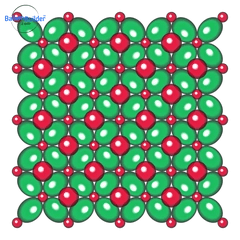
Link Balloon Grid
Classic grid using link balloons with round fillers. The most versatile wall pattern.
Link Balloon X Pattern
X-shaped link balloon arrangement for high-impact walls with complex color designs.

Alternate Size Pack
Alternating large and small round balloons packed for a lush, full look. Also available rotated 90°.

Duplet Square Pack
Pairs of round balloons in a square grid — great for precise graphical designs. Also available rotated 90°.
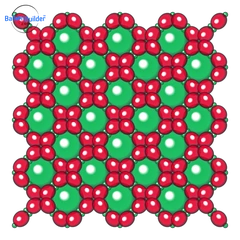
Plus Link Wall
Link-O-Loon balloons in plus formation with large round balloon fillers. Design by Colin Myles.

Foilballoon Wall
Starpoint, square, or round foil balloons in a decorative wall pattern.
- Link Balloon Grid: Classic grid using link balloons with round fillers.
- Link Balloon X Pattern: X-shaped link arrangement for complex color patterns.
- Alternate Size Pack: Alternating large and small round balloons, horizontal or vertical (90°).
- Duplet Square Pack: Pairs of round balloons in square grid, horizontal or vertical (90°).
- Plus Link Wall: Link-O-Loon balloons in plus formation with large round fillers.
- Foilballoon Wall: Starpoint, 18″ foil square, Grabo 24″ square, or Grabo 36″/18″ round foil balloons.
🧱 Wall Design Features
- Size Control: Set balloon sizes and spacing for precise wall dimensions.
- Color Patterns: Apply automatic color schemes or paint balloons individually.
- 3D Preview: See your wall design in realistic 3D perspective.
- Double Layer: Create multi-layered walls (Grid & X Pattern) for extra depth, more stable structure, and support-free sculptures.
- Open Structure: Toggle open framework view (X Pattern & Plus Link) to visualize the structural skeleton.
- Tunnel Mode: Transform any Grid, X Pattern, or Foilballoon Wall into a 3D balloon tunnel arch. Adjust the number of straight wall rows and switch to Tunnel View to see the front-on perspective.
Design Modes
BalloonBuilder supports many design modes for different structures:
Columns
- Column: Standard vertical balloon column.
- LOL Column: Link-O-Loon style with connecting balloons.
- Horizontal LOL: LOL balloons arranged horizontally.
- Simple LOL Column: Simplified LOL arrangement.
- LOL Silhouette: Create custom shapes using LOL balloons.
Arches
- Arch: Classic half-circle arch.
- Demi-Arch: Quarter arch (one side only).
- U-Arch: Square arch with straight sides and curved top.
- Rainbow Arch: Multi-layer arch with different colors.
- Custom Path: Draw your own arch shape.
Design Gallery
Examples of what you can create with BalloonBuilder:
Columns

Spiral Column
Classic spiral pattern with multiple colors winding around the column.

Shaped Column
Column with balloon sizes changing from bottom to top to create simple balloon sculptures or design columns.

Link-O-Loon Column
Link-O-Loon balloons can be used to create larger columns or sculptures.

Custom Column
You can create the column shapes and keep your own gallery of shapes.
Arches

Classic Arch
Traditional arches in U-shape, circular shape or standard half-circle shape.

Organic Arch
Natural, flowing arrangement with varied balloon sizes.

Demi Arch
Quarter arch perfect for corners or one-sided displays.

Custom Path
Draw any shape and fill it with balloons.
Rainbow Arches

6-Color Rainbow
Classic rainbow with six distinct color layers.

Pastel Rainbow
Soft pastel colors for elegant events.

Gradient Rainbow
Smooth color transitions between layers.

Star Pattern
Creative patterns within the rainbow structure.
Walls & Sculptures

Plus-Link Wall
Use Link-O-Loons to create big impact walls with large round balloons as fillers.

X Pattern
X-pattern Link-O-Loon balloon wall can be used to create high-impact balloon walls with simple or more complex color patterns.

Double Layered Walls
Create multi-layered walls for extra dimension, more stable structure and supportless sculptures.

Duplet Square Pack
Duplet square pack walls are especially good for more complex graphical designs using only round balloons.
Export Example
Here’s what the export feature generates:

2D Design View

3D Render

Balloon Counts

Assembly Guide